
AI-Powered Sports Performance Tracking App
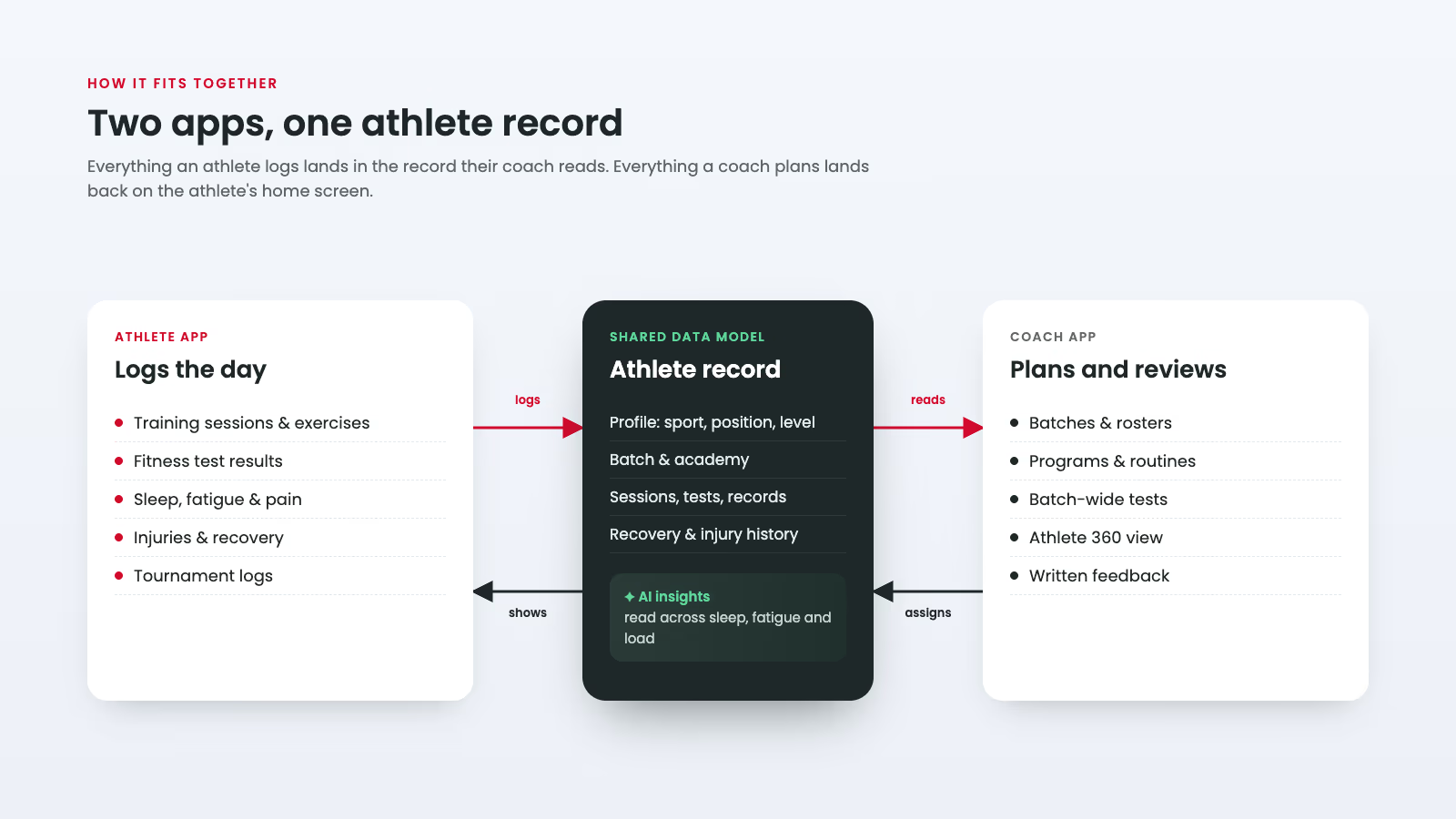
Adathlete is a training and recovery platform for athletes who train inside an academy, under a coach, towards tournaments. Its tagline sets the brief: track more, train more. An athlete logs a session in a few taps, and their coach sees it the same day, next to their sleep, fatigue, test scores and injury history. We designed and built two Flutter apps on one shared data model: an athlete app for Android and iOS, and a coach app for running batches, programs and assessments across a whole academy. The work covered UX research, an illustrated design system with its own mascot, both apps and the Node.js and MongoDB backend, in four months.
Adathlete
Mobile App Development
Healthcare
4 months
Project in numbers
4 months
2
7
Problem statement
Academy athletes in India train most days of the week, but the record of that work is scattered across four places:
- Notebooks for session logs, which nobody could compare across weeks
- WhatsApp groups for the day's plan, buried under chat by the evening
- Spreadsheets for fitness tests, filled in by one coach and rarely shared
- Memory for sleep, soreness and niggles, until a niggle became an injury
Three gaps mattered most:
- No benchmark. A Yo-Yo test score of 18.2 meant nothing to a 17-year-old without knowing whether that was below standard or very good.
- No early warning. Short sleep and rising fatigue showed up in performance days before anyone wrote them down.
- No single view. A head coach with three batches of 20 to 30 athletes, plus a physio, had no way to see one athlete's training, recovery and test history together.
Generic fitness apps did not fit either. They are built for an individual in a gym, not for an athlete whose plan is set by a coach and whose season ends in a tournament.
The design problem: make logging fast enough that athletes do it every day, and make the resulting data useful enough that coaches open it every day.
Tech stack







Our solutions
Adathlete is two apps that share one athlete record. Each feature below exists to put data into that record or to turn it into a decision, for the athlete or for the coach.
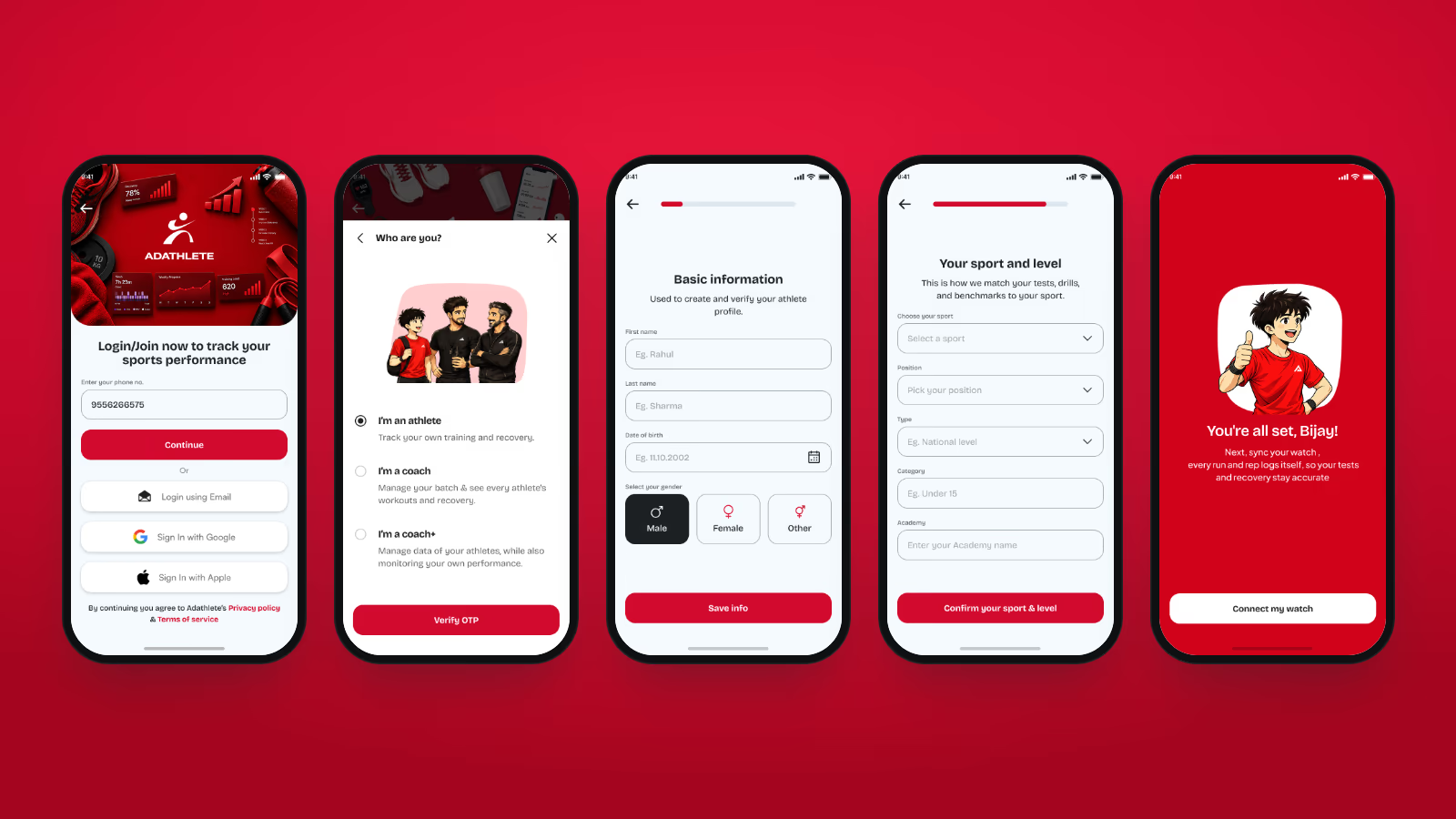
1. Onboarding that profiles the athlete in about 90 seconds
The app can only benchmark an athlete against the right standard if it knows who they are. Onboarding collects exactly that and nothing more.
- Sign in with phone OTP, email, Google or Apple, then pick a role: athlete, coach, or coach+ (a coach who also trains)
- Basic information, then height and weight on illustrated, one-question screens
- Sport, position, type, category and academy: the five fields that decide which tests, benchmarks and batch rankings an athlete sees
- A closing screen that asks the athlete to connect a smartwatch so every run and rep logs itself
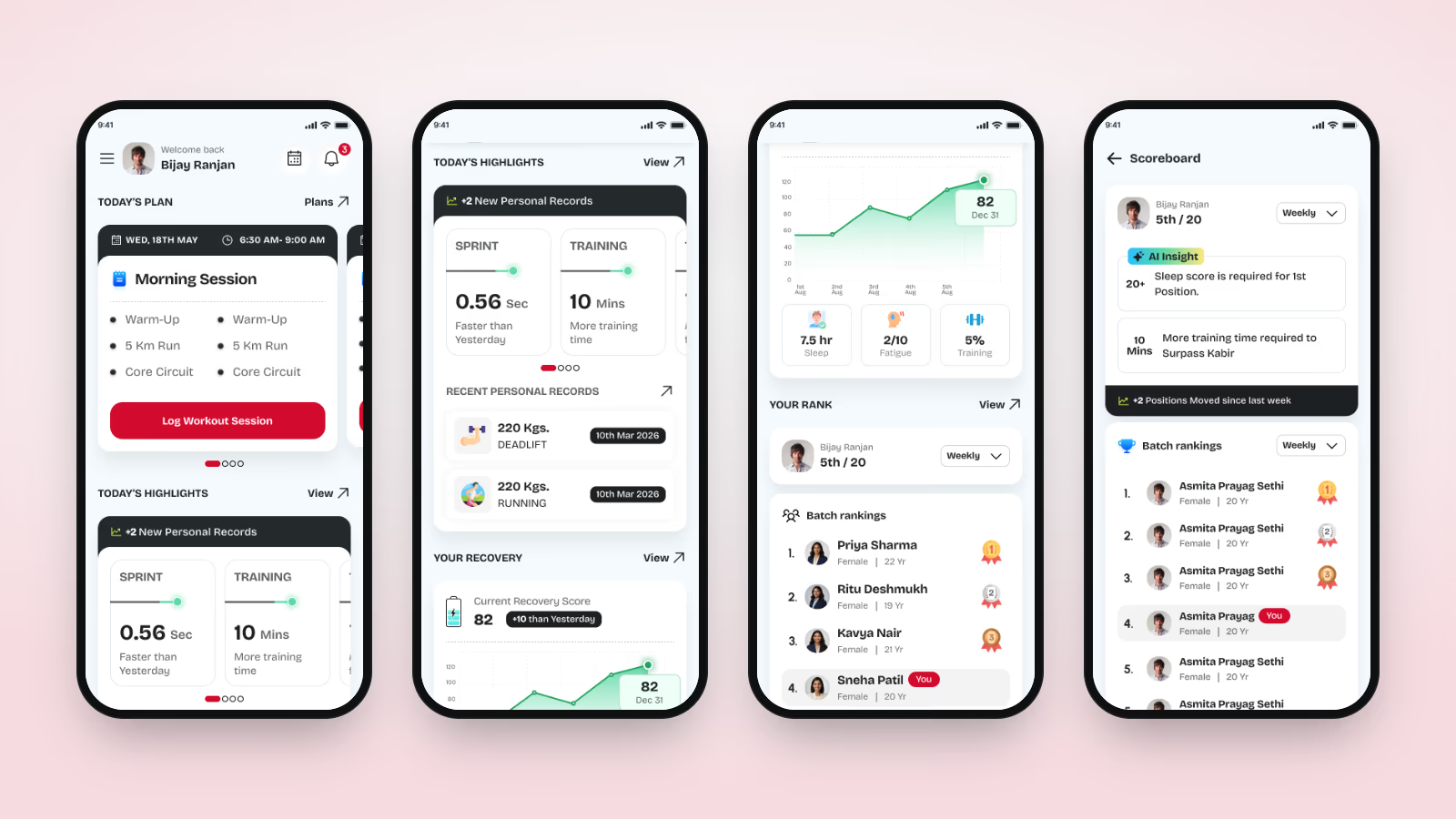
2. A home screen that answers "what do I do today?"
The home screen is ordered by what an athlete needs before training, not by app section.
- Today's plan: the session the coach scheduled, its drills and time slot, and a single Log Workout Session button
- Today's highlights: new personal records and the day-on-day change in sprint and training time
- Your recovery: the current recovery score and its trend, with sleep, fatigue and training load underneath
- Your rank in the batch, weekly or overall, with an AI tip on what it takes to move up, for example "10 more minutes of training time to pass Kabir"
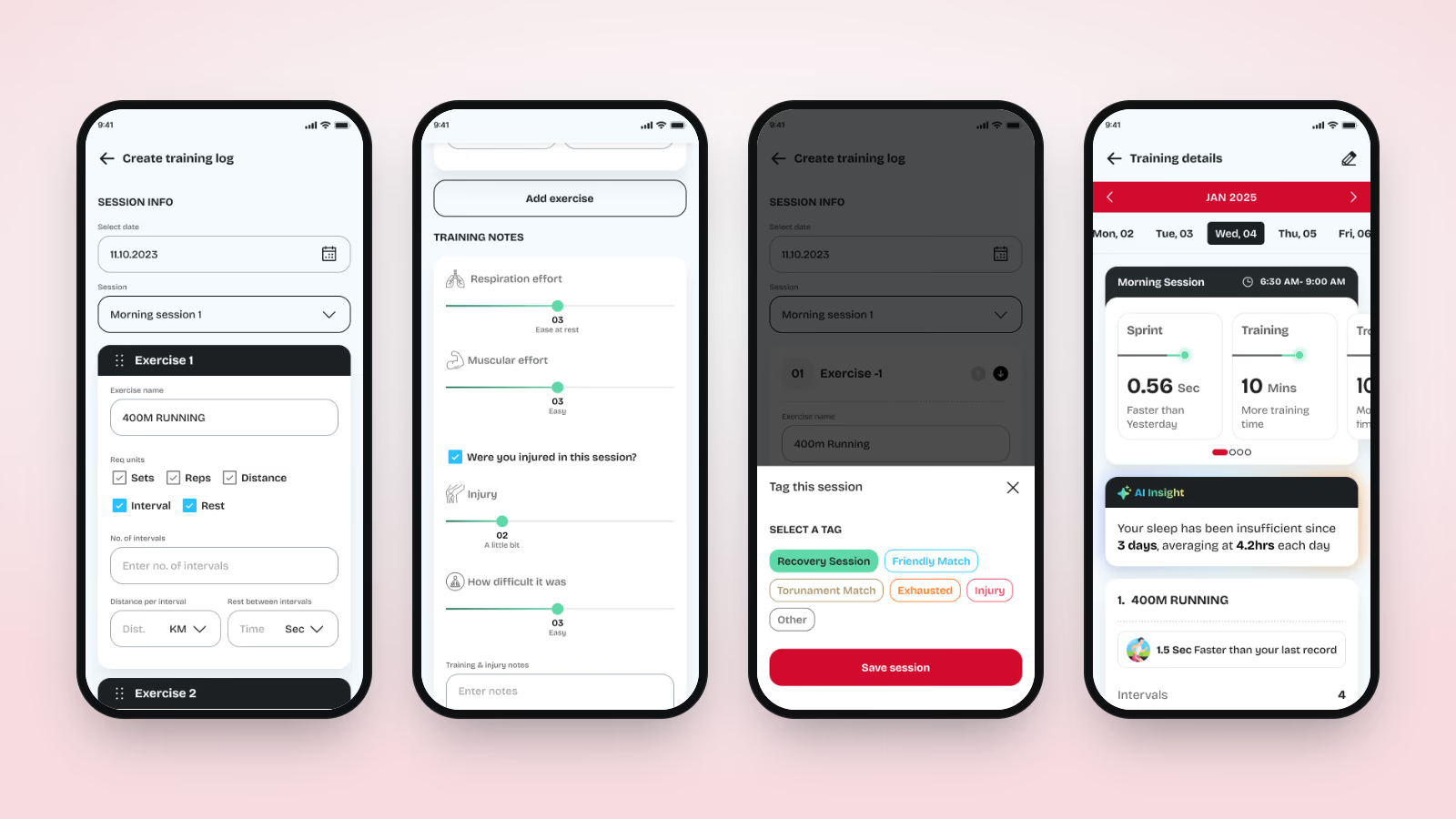
3. A training log built for comparison
Every exercise is stored with the same structure, so the app can say "1.5 sec faster than your last record" instead of just storing a note.
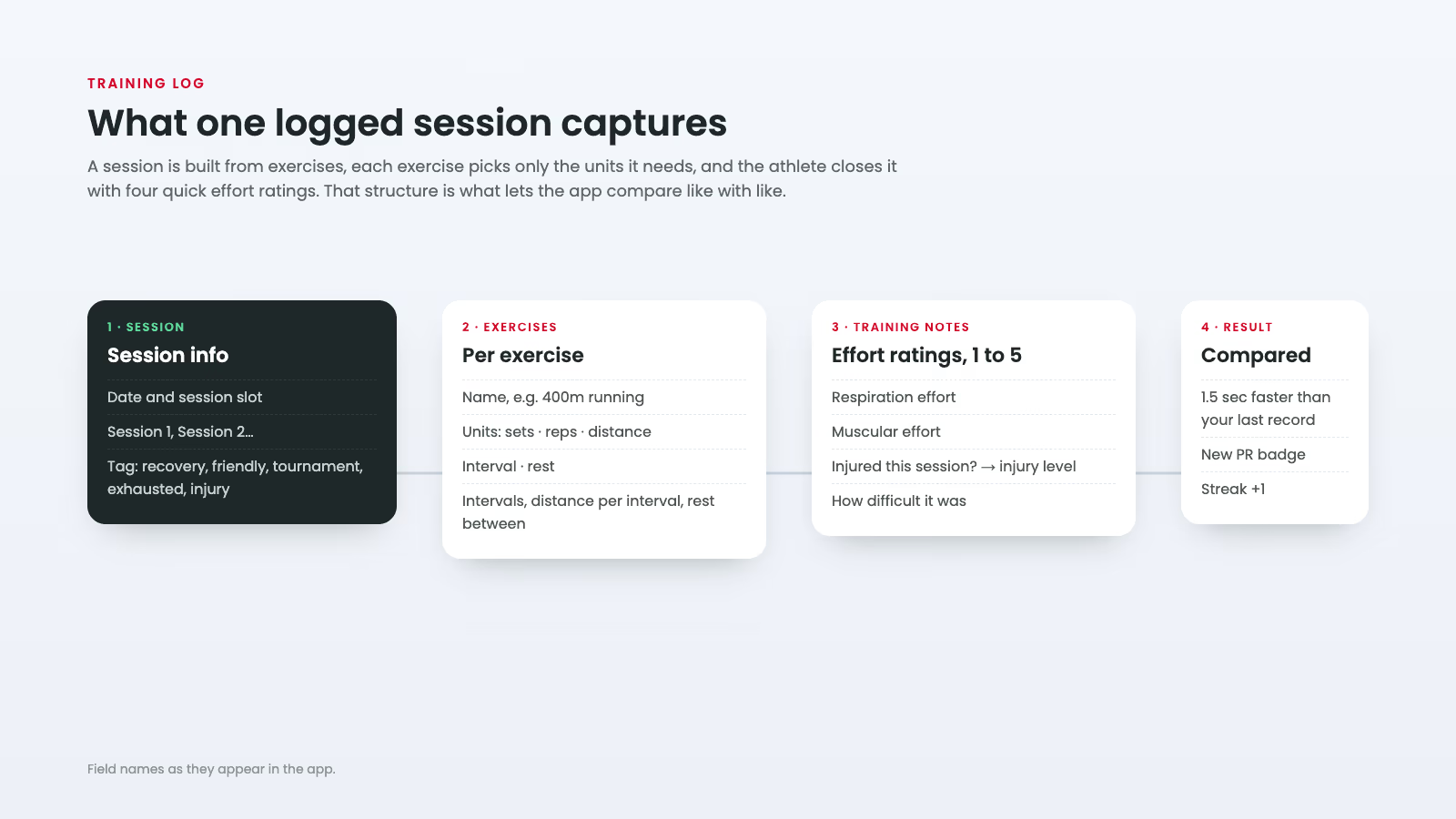
- A session holds any number of exercises, and each exercise switches on only the units it needs: sets, reps, distance, interval or rest
- Interval work records the number of intervals, distance per interval and rest between them
- Four one-tap ratings close the session: respiration effort, muscular effort, injury level and difficulty
- Tags (recovery session, friendly match, tournament match, exhausted, injury) let the app separate a hard match day from a bad training day
- A training calendar opens any past day with its sessions, comparisons and notes
4. AI insights that read the whole picture
Single numbers are easy to dismiss. Insights read sleep, fatigue and training together and describe a pattern across days: what is happening, the numbers behind it and one thing to do about it.
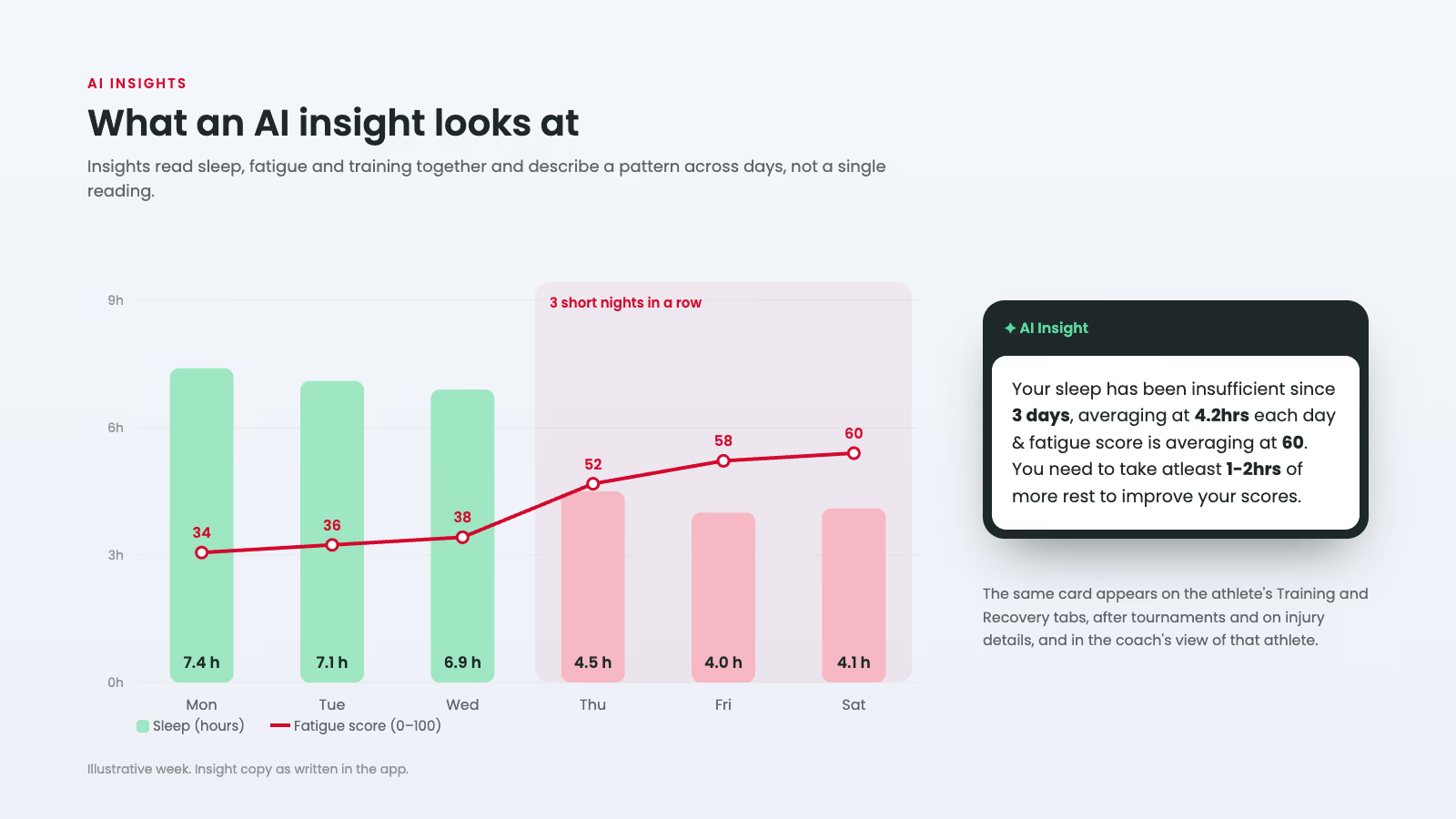
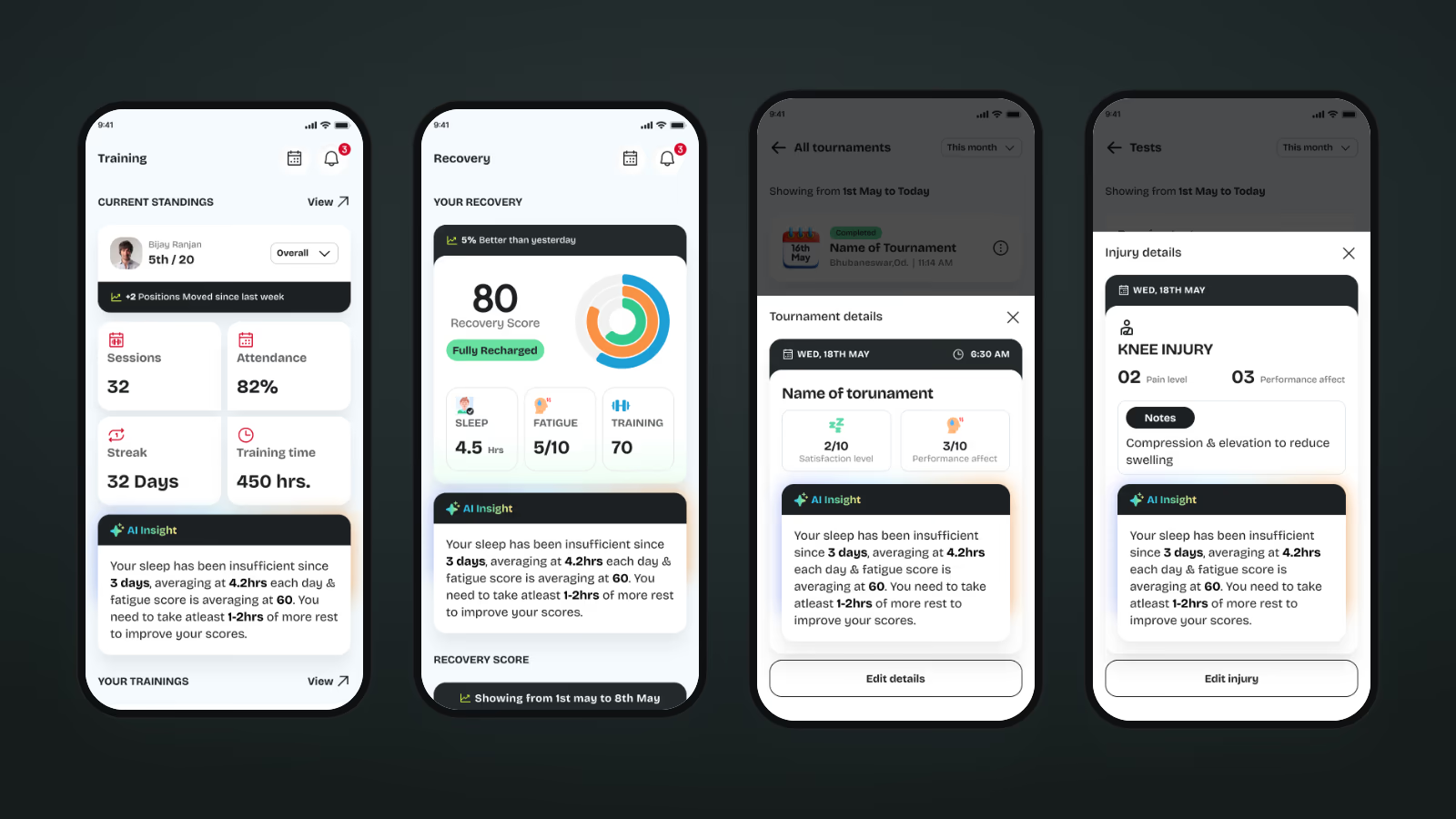
- Shown on the Training and Recovery tabs, on tournament details and on injury details
- The same insight appears in the coach's view of that athlete, so the conversation starts from the same data
- Scoreboard insights are about rank instead: what is required to reach first position and how far the athlete moved this week
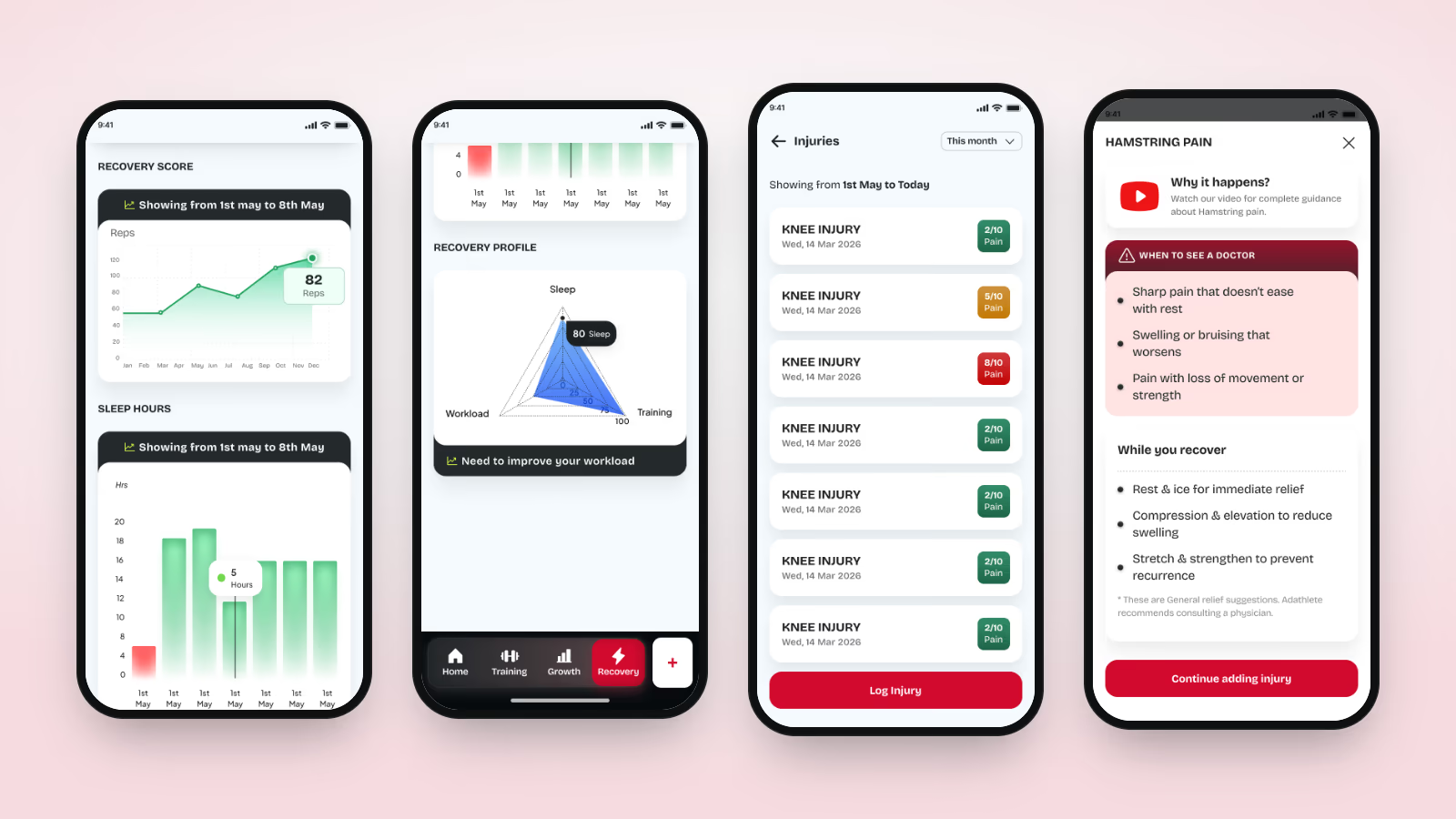
5. Recovery and injury care
We gave recovery the same weight as training. It has its own tab in the bottom bar.
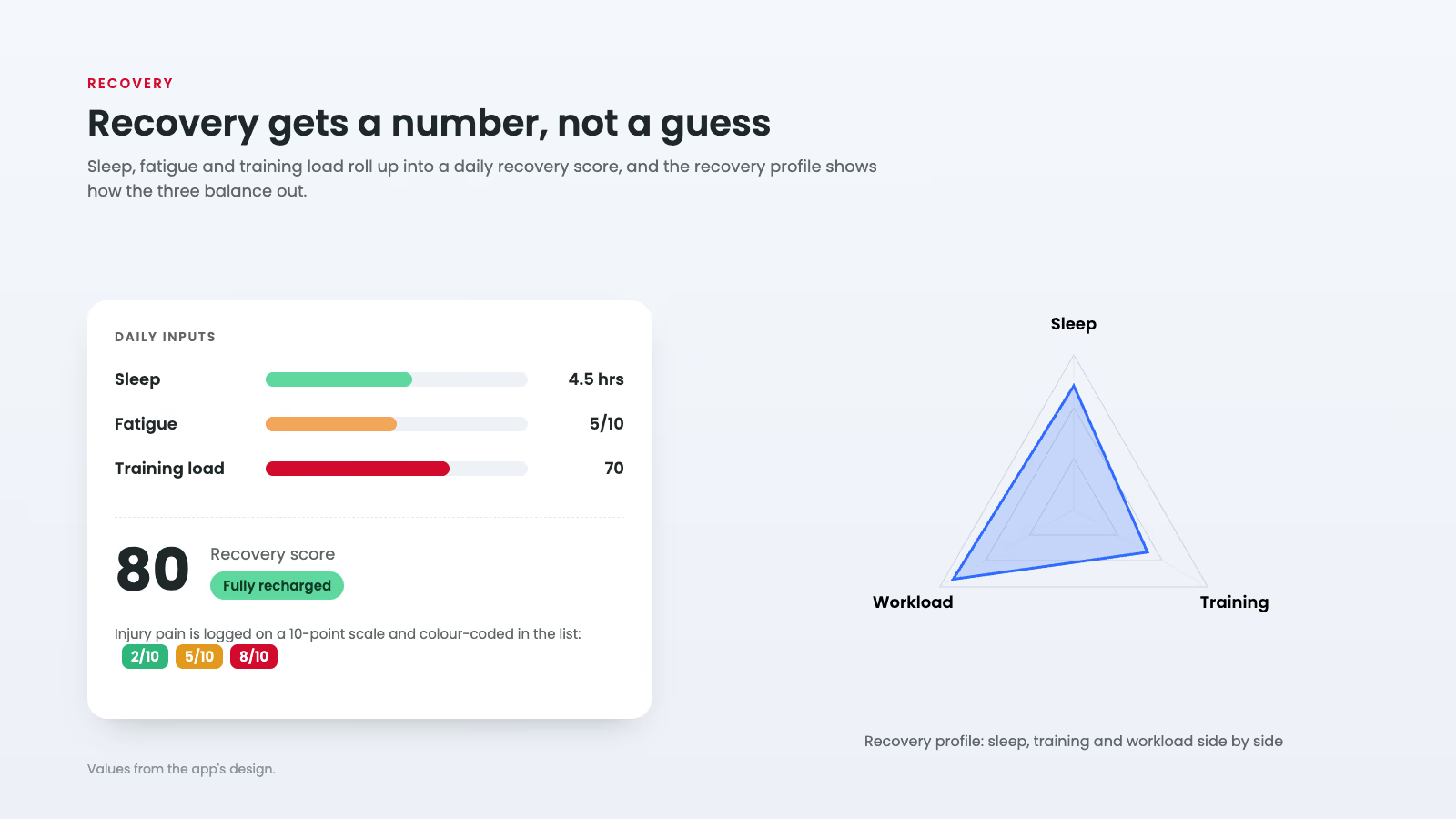
- A daily recovery score from sleep, fatigue and training load, with a label such as "Fully recharged" and a trend line
- Sleep hours by day and a recovery profile radar comparing sleep, training and workload
- Injury logs with date, pain level out of 10, how much it affects performance, and notes; the list is colour-coded green, amber and red by pain
- Sport-specific guidance for common injuries such as hamstring strain, lower back pain and shoulder pain: why it happens, when to see a doctor and what helps while recovering
6. Fitness tests with real benchmarks
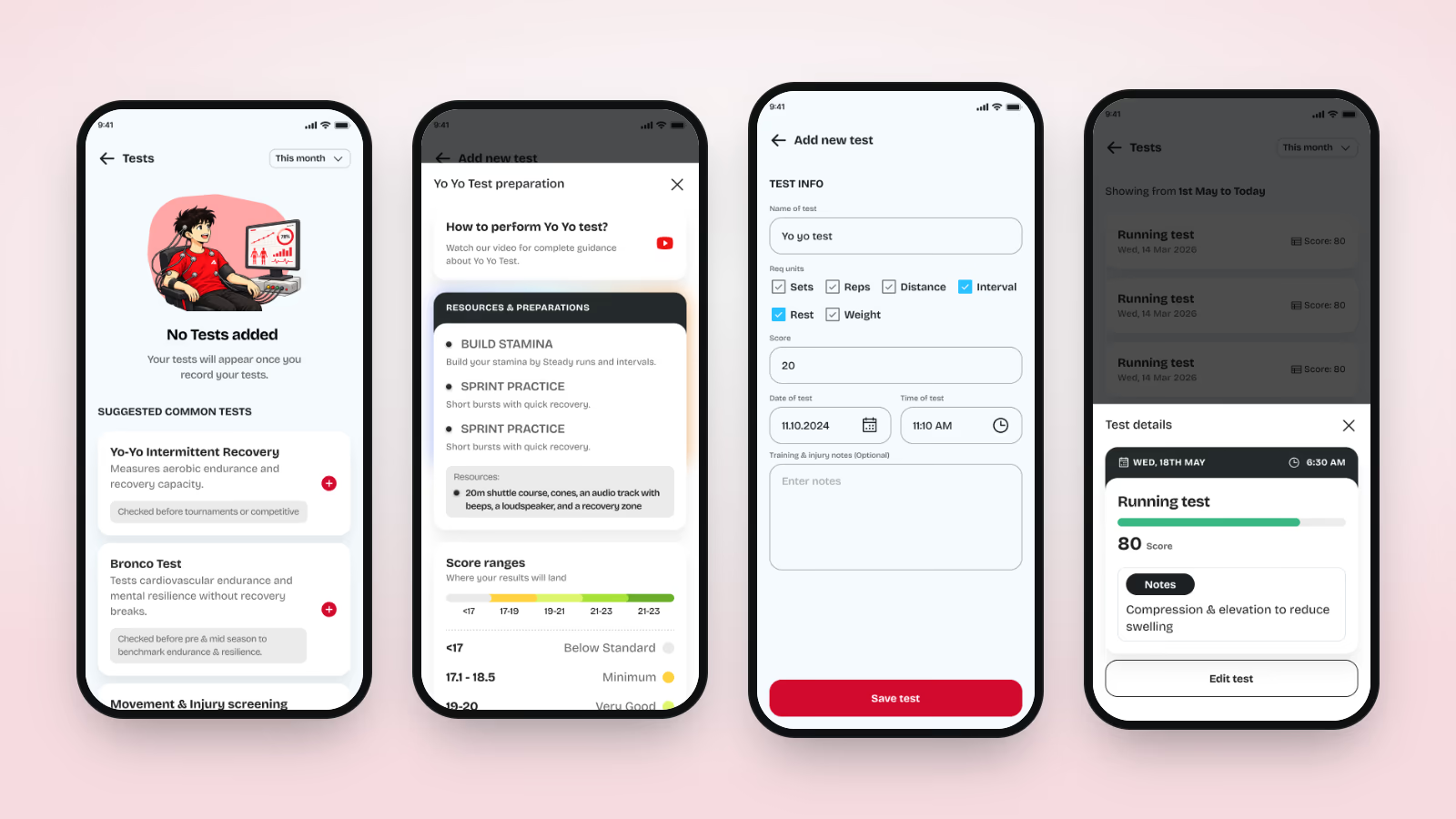
Tests are suggested per sport, prepared for in the app and scored against defined score ranges, so a result means something the moment it is saved.
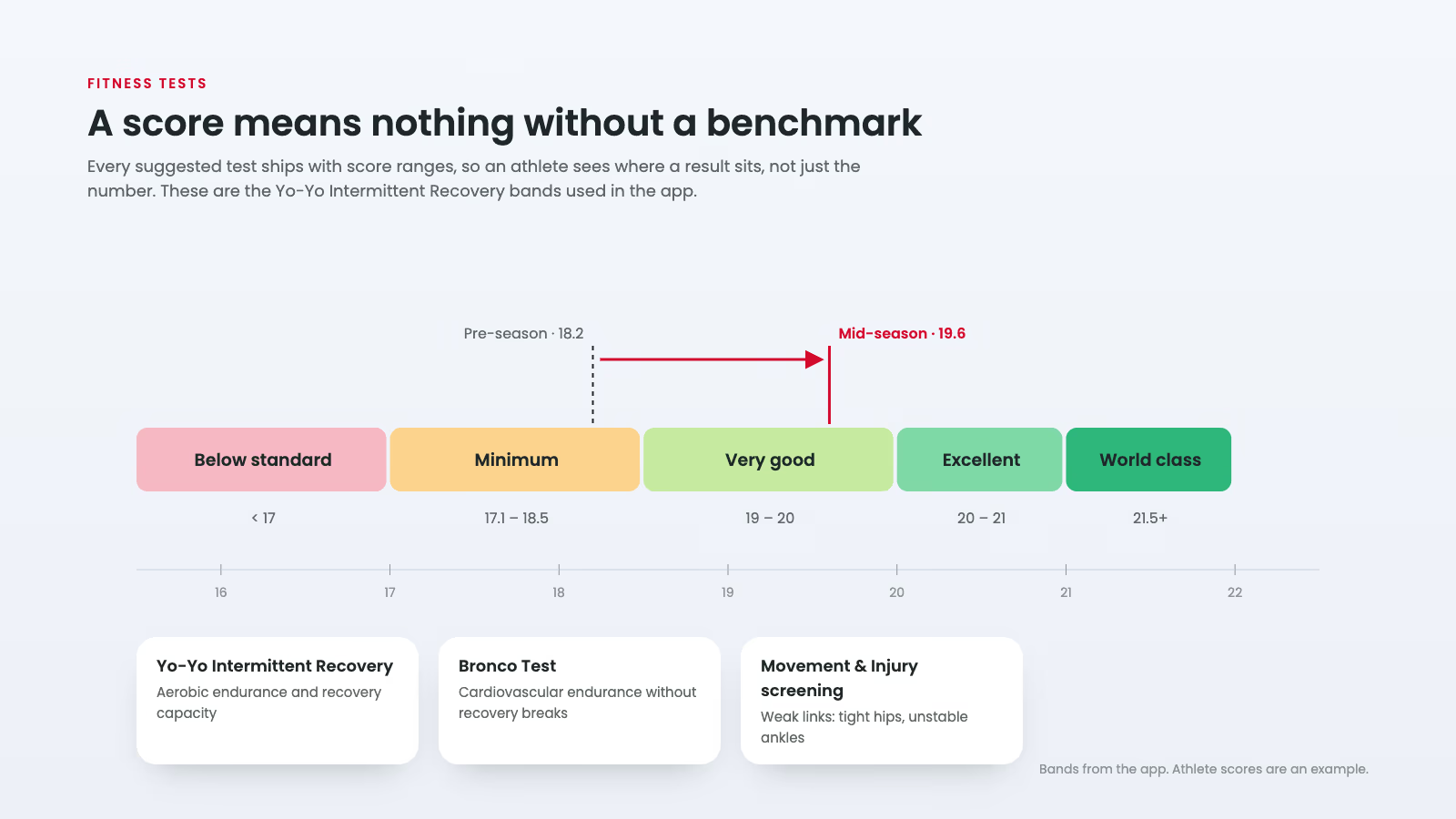
- Suggested tests for each sport, for cricket the Yo-Yo Intermittent Recovery test, the Bronco test and movement and injury screening, each with when it should be run
- A preparation sheet per test: a how-to video, the equipment needed and drills to build for it
- Score ranges from below standard to world class shown before the test, and the result placed on them after
- Results feed personal records and the monthly report card automatically
7. Growth charts, scoreboards and report cards
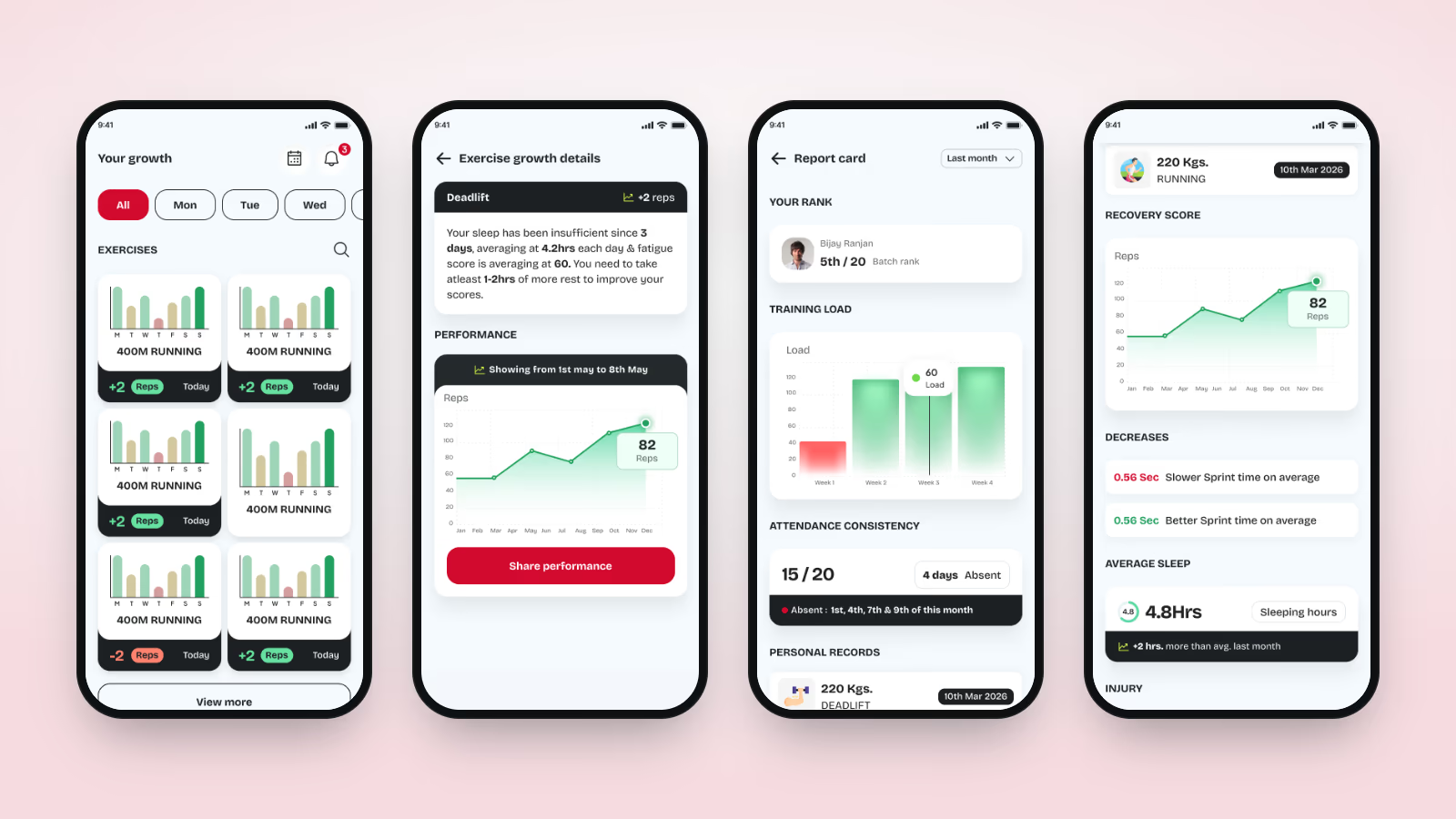
Progress needs to be visible to stick. Three views show it at different time scales.
- Your growth: a small weekly chart per exercise, with the change in reps or time since last week
- Exercise growth details: a performance line over months, with an AI note and a Share performance button
- Report card for the month: batch rank, training load per week, attendance (15 of 20 days, with the absent dates listed), personal records, recovery score, decreases to work on, average sleep, injuries and tournaments, exportable as a PDF for parents and selectors
8. Programs, routines, schedule and tournaments
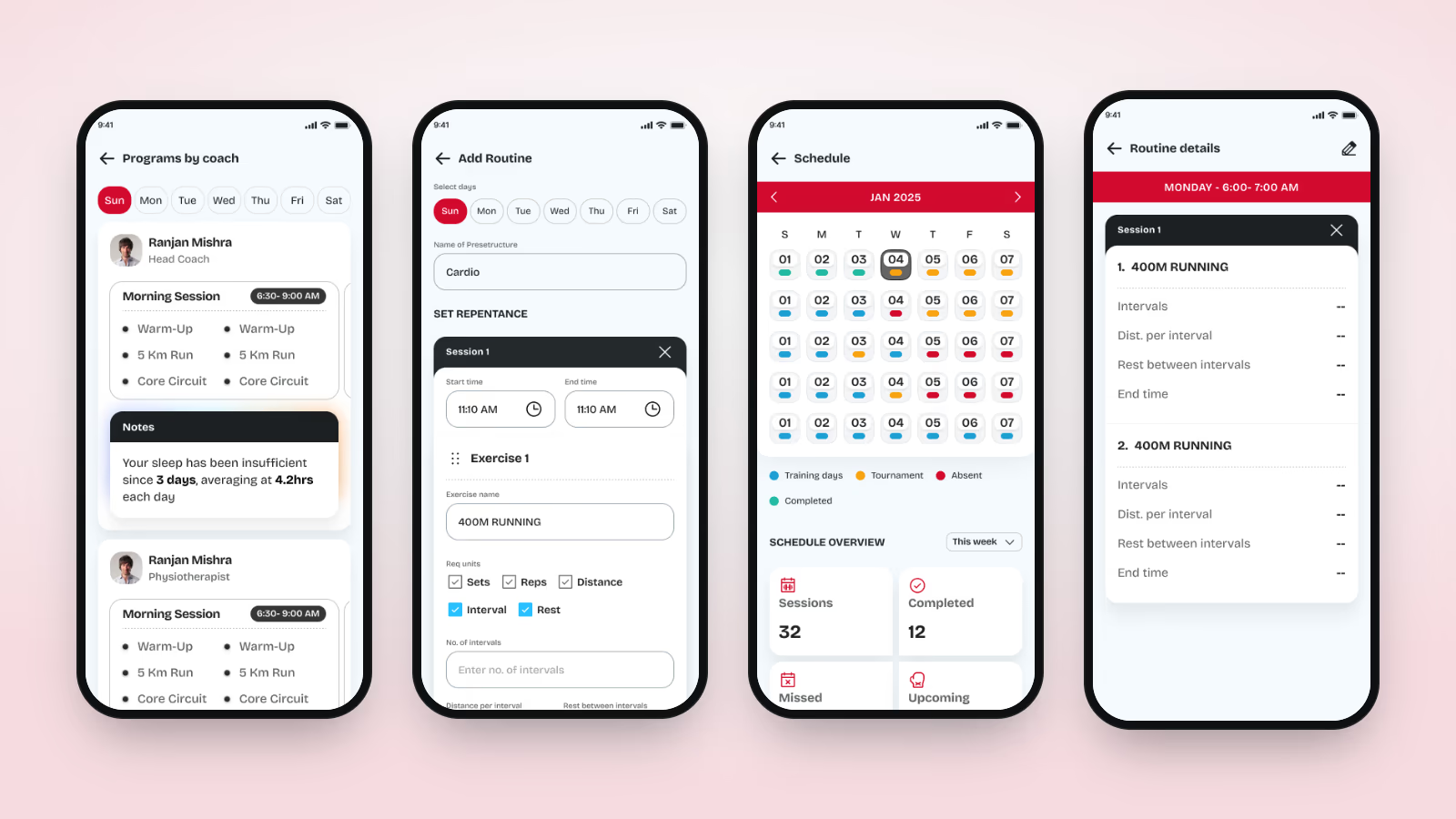
- Programs by coach: each day's sessions from the head coach, the physiotherapist and other staff, with their notes
- Routines: reusable templates with selected days, sessions, start and end times and exercises
- A schedule calendar coloured by training day, tournament, missed and completed, with a weekly count of sessions, completed, missed and upcoming
- Tournaments with a post-event log, a satisfaction rating and a performance-impact rating, followed by an insight
9. Coach onboarding and academy setup
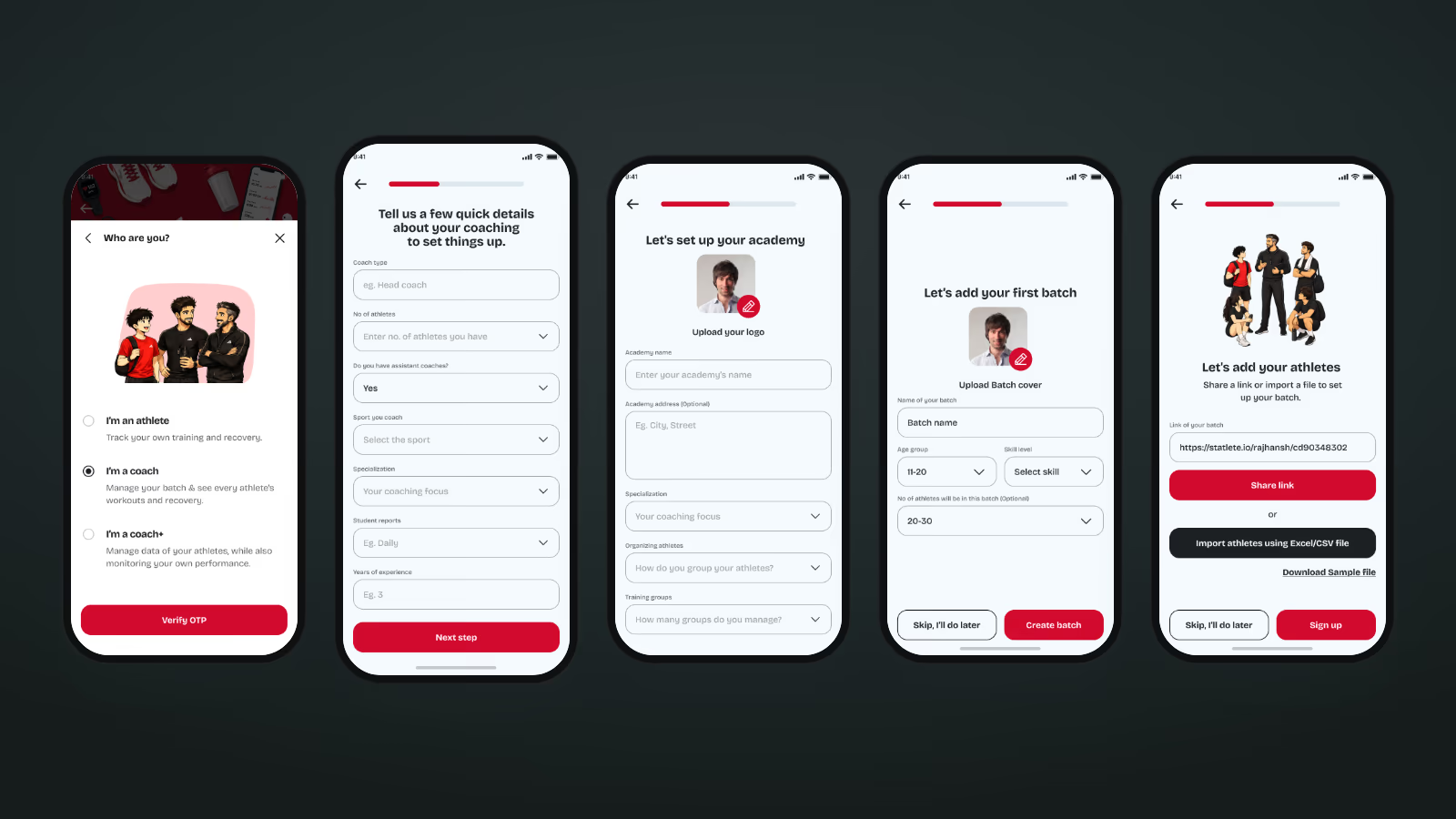
The coach app starts by setting up the academy, because every later screen depends on how its athletes are grouped.
- Coach type, number of athletes, assistant coaches, sport, specialisation, report frequency and years of experience
- The academy: logo, address, specialisation and how athletes are organised into training groups
- A first batch with cover, age group, skill level and expected size
- Athletes join through a shareable batch link, or a whole squad arrives at once through an Excel/CSV import from a sample file
10. Batches and programs at academy scale
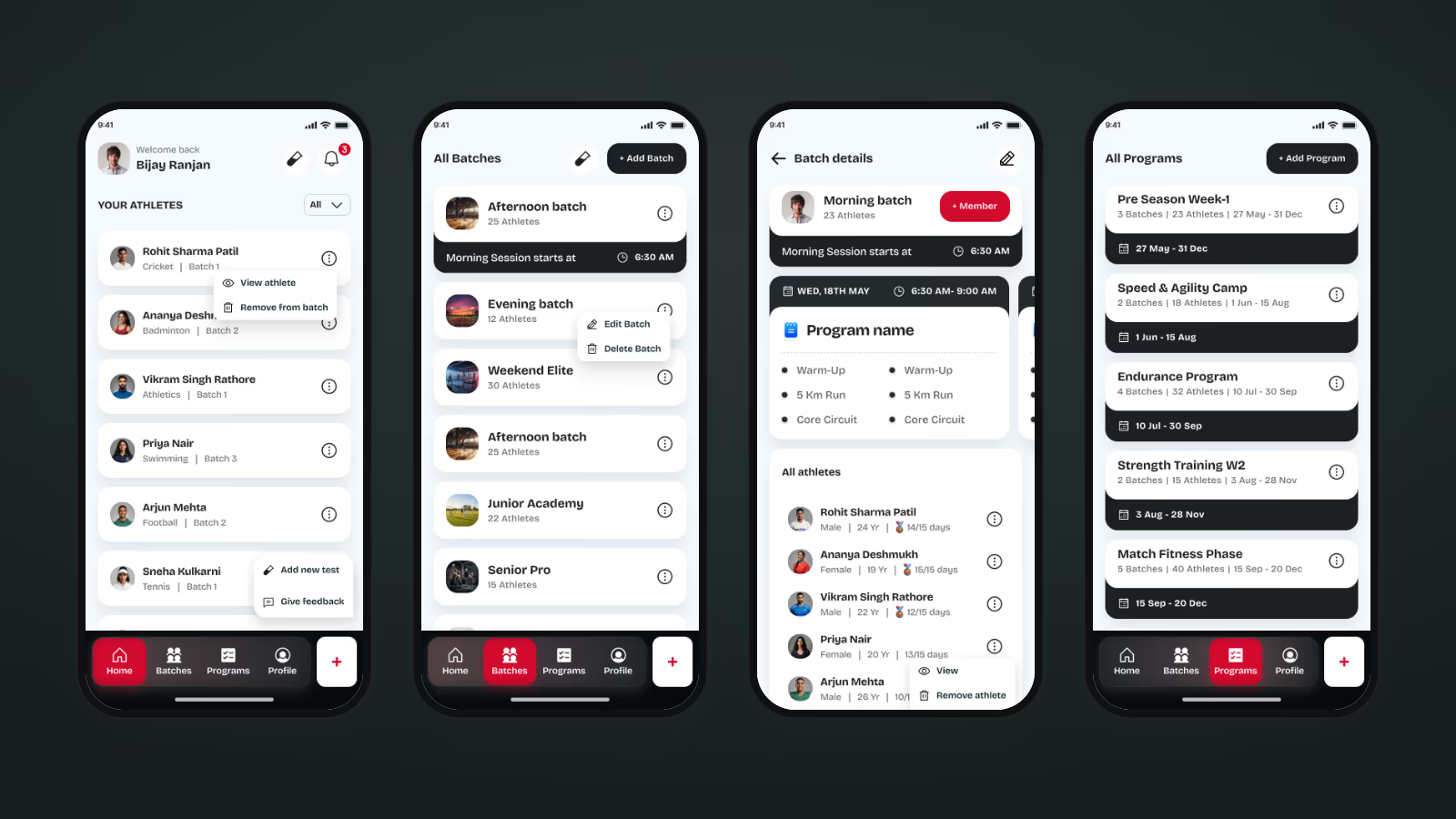
- A home screen listing every athlete with sport and batch, and quick actions to view, add a test or give feedback
- Batches with session timings, members and an attendance count against total days for each athlete
- Programs with date ranges and athlete counts, assigned to whole batches or selected athletes
11. One view of every athlete
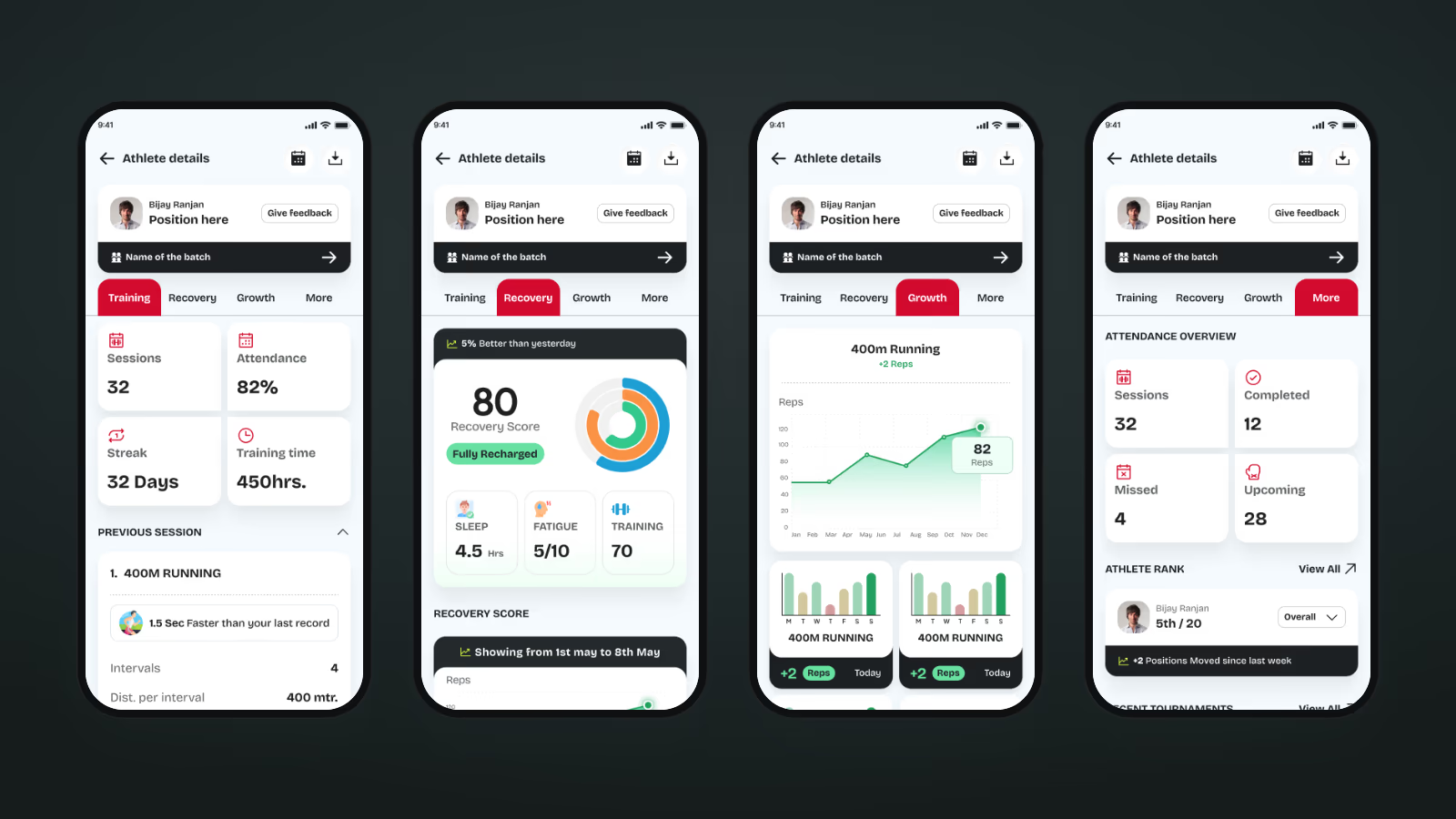
Before a session, a coach opens one athlete and sees four tabs, built from the same data the athlete sees.
- Training: sessions, attendance, streak, training time, the last session's exercises and effort ratings
- Recovery: recovery score, sleep hours and recovery profile
- Growth: exercise-by-exercise progress charts
- More: attendance overview, rank in the batch and recent tournaments, plus a full schedule calendar
12. Batch-wide tests and written feedback
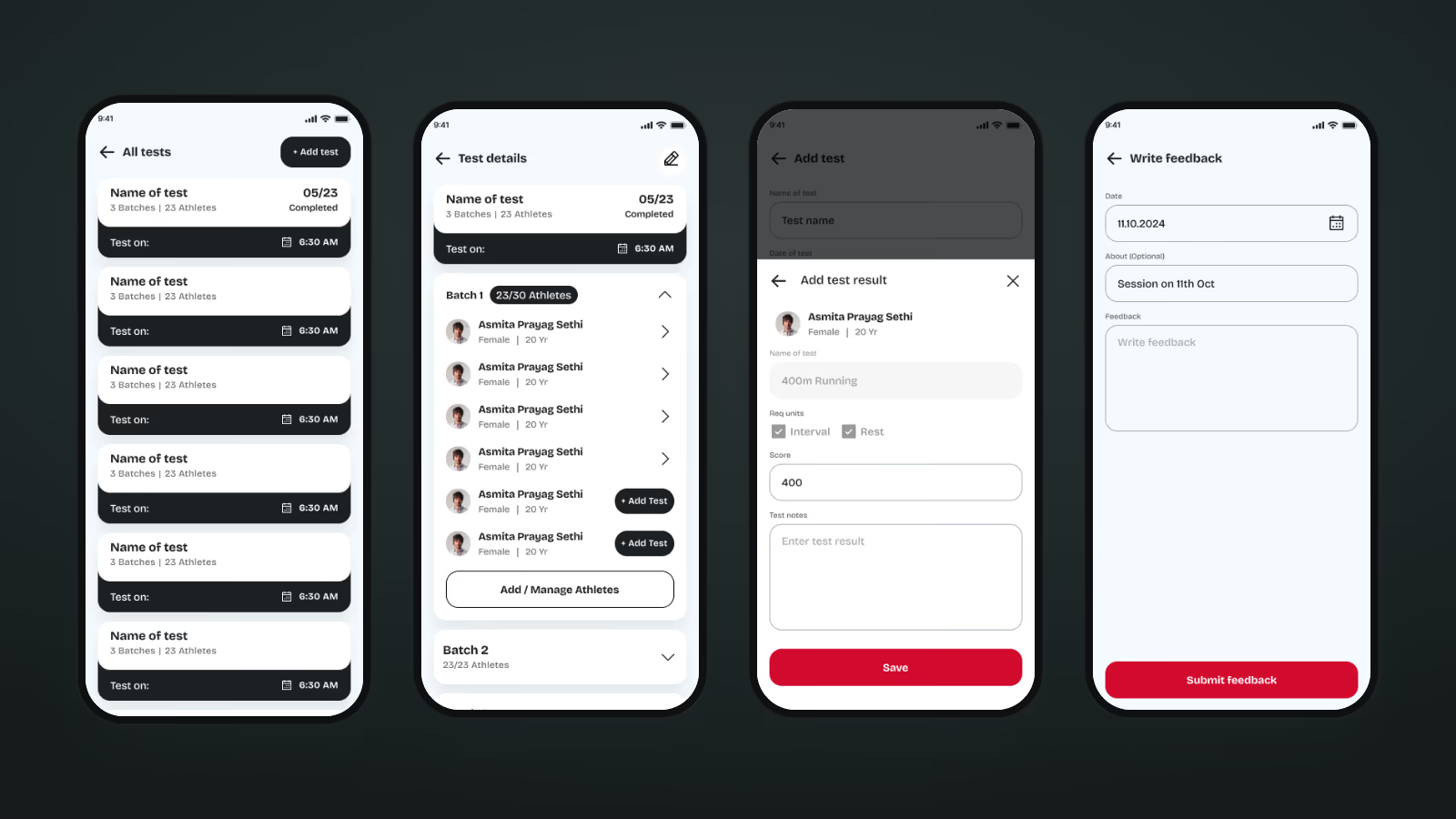
- Create a test once and assign it to one or several batches; the list shows completion, for example 05/23
- Open a batch inside the test to enter each athlete's result and notes, with an Add Test button on whoever is still pending
- Written feedback to any athlete, dated and titled, which lands in their Feedbacks section
13. Every state designed, not just the happy path
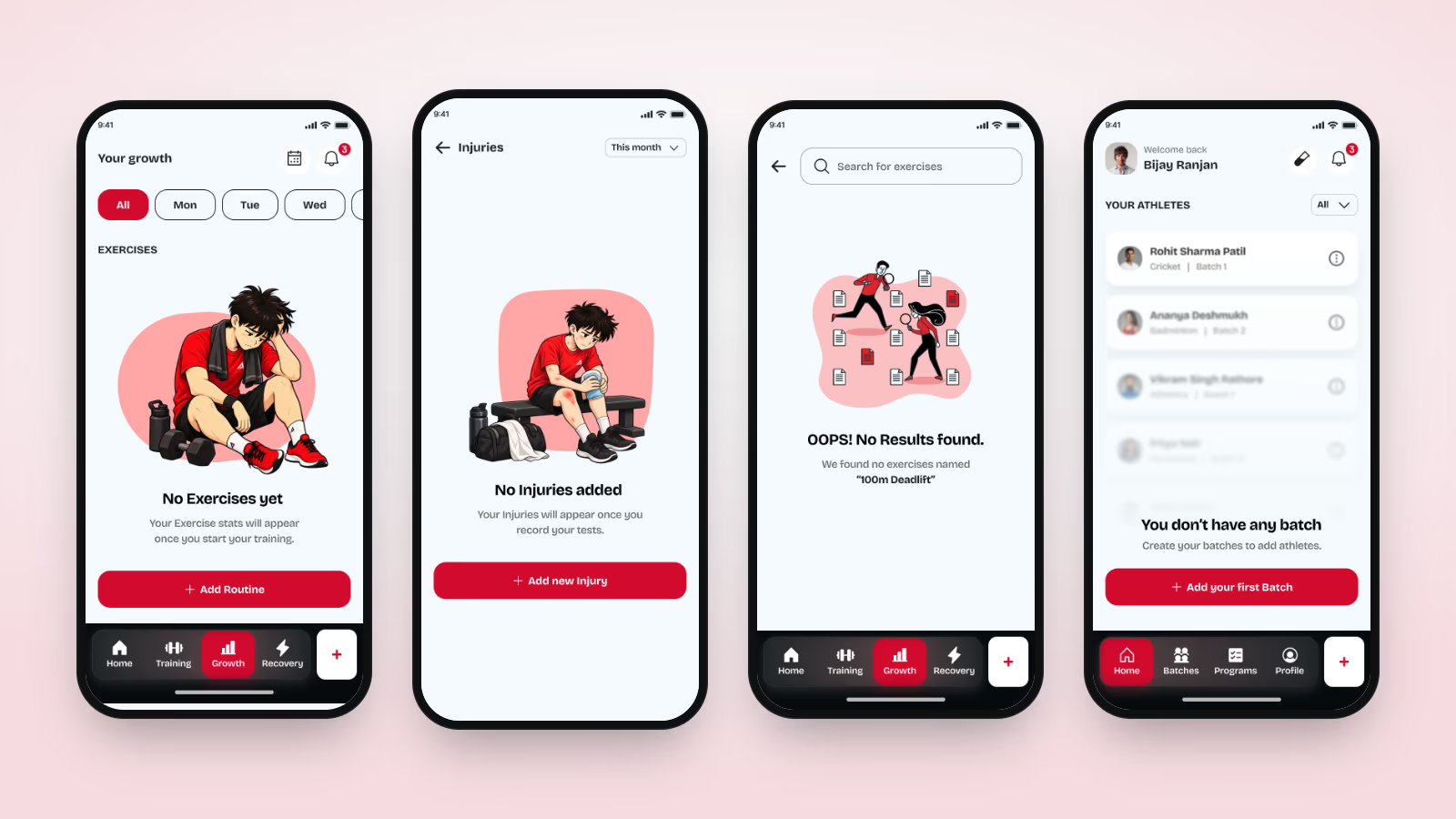
A new athlete has no data, so empty states do real work. Each one uses the Adathlete mascot and ends in the one action that fills it: add a routine, log an injury, add a test, create a first batch. No-results, no-internet and error screens follow the same pattern.
Product Branding & Style guide
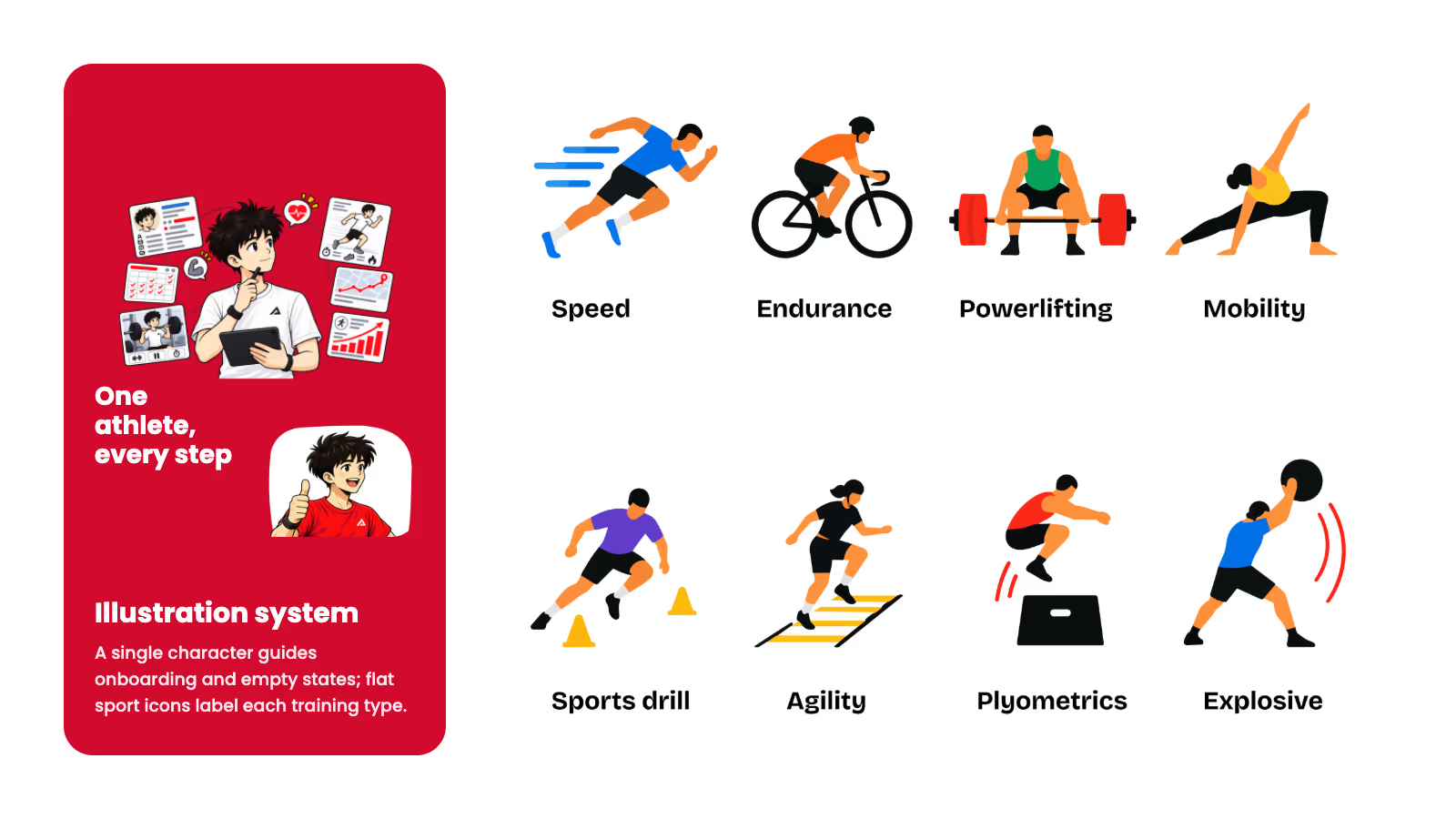
Feature Screenshots
Key Features Delivered
Athlete app
- Sport, position and level profiling in about 90 seconds
- Today's plan, one-tap workout logging and streaks
- Structured training logs with effort ratings and session tags
- AI insights across sleep, fatigue and training load
- Daily recovery score, sleep tracking and injury logs with guidance
- Sport-specific fitness tests with score ranges and personal records
- Growth charts, batch scoreboards and a PDF monthly report card
- Programs by coach, routines, schedule and tournament logs
Coach app
- Academy and batch setup with link and Excel/CSV invites
- Program planning and assignment to batches or athletes
- Athlete 360 view across training, recovery, growth and attendance
- Batch-wide tests, results and written feedback
Results
Adathlete replaces the notebook, the WhatsApp plan and the test spreadsheet with one record that the athlete and the coach both read.
What changed for each side
- Athletes log a session in seconds and get something back straight away: a comparison with their last record, a streak, a rank, or an insight when sleep and fatigue start to slide.
- Coaches open one athlete and see training, recovery, tests and tournaments together, instead of asking around before a session.
- Academies bring a squad on board from a single CSV file or a shared link, and run tests across every batch from one screen.
- Parents and selectors get a monthly report card as a PDF, with rank, attendance, records and recovery in one page.
What made it work
- A shared data model, so nothing an athlete logs has to be re-entered by a coach
- Benchmarks shipped with every test, so scores are meaningful on day one
- Insights that describe a pattern across days with one clear action, rather than a single number
- An illustrated mascot and designed empty states that make a new, empty app feel like it is guiding you rather than waiting for you
Explore more case studies
Other products we've designed, built and shipped for startups and growing businesses.
Whether you’re redesigning or starting fresh, we help you align in strategy,design,andtechnology.
What you get when you work with us
- NDA signed before you share anything
- We learn the business, not just the brief
- Brainstorm directly with our founders
- Progress you can see, daily and weekly
- Pricing that stays honest as scope moves