PostgreSQL 19 is due for general availability on November 19, 2026, and its biggest new features are about running a busy database, not writing fancier SQL. The PostgreSQL Global Development Group confirmed that date when it shipped 19 RC 2 on November 12, "unless an issue is discovered" that forces a delay.
The road here was longer than usual. Beta 1 landed on June 4, RC 1 followed on October 15, and several headline features were reverted along the way. The same November 12 update was also the final release of PostgreSQL 14, which is now end-of-life.
Why it matters if you build apps: three long-standing headaches get official fixes. You can rebuild a bloated table without taking it offline, read your own writes from a replica, and pin a query plan that keeps regressing.
The takeaway? PostgreSQL 19 is an operations release: REPACK CONCURRENTLY and WAIT FOR LSN are the upgrade reasons, and the graph queries many roundups promised didn't make it.
Key Takeaways
- PostgreSQL 19 is planned for GA on November 19, 2026. Its headline features are REPACK (CONCURRENTLY), WAIT FOR LSN on replicas, the pg_plan_advice extension and logical replication of sequences.
- SQL/PGQ graph queries, GROUP BY ALL, partition MERGE/SPLIT and online checksum toggling were pulled during beta. Older "new features" lists still include them.
- Before upgrading, check MD5 password logins, old dumps made with standard_conforming_strings off, code that expects json_array() to return NULL, and the new defaults (JIT off, max_locks_per_transaction 128).
What's new in PostgreSQL 19: the short list
PostgreSQL 19 ships a small set of operational upgrades that matter to almost every production team, plus dozens of smaller SQL and monitoring additions. These are the highlights from the official release notes, dated "as of" October 9, 2026:
- REPACK, a new command that reclaims disk space and reorders a table. REPACK (CONCURRENTLY) does it without blocking reads and writes.
- WAIT FOR LSN, which lets a standby wait until it has caught up to a given point in the write-ahead log, so your app can read its own writes from a replica.
- pg_plan_advice and pg_stash_advice, extensions for steering and stabilising planner decisions.
- Logical replication of sequence values, plus turning on logical replication without a restart when wal_level is replica.
- Parallel autovacuum of table indexes and a new scoring system that decides which tables autovacuum handles first.
- Automatic scaling of I/O workers when io_method is worker, and faster foreign-key checks.
For application code, a few smaller items stand out too. COPY TO can now output JSON, and jsonpath gets string methods such as lower(), replace() and split_part(). The release notes also add INSERT ... ON CONFLICT DO SELECT ... RETURNING, which returns the conflicting row, and IGNORE NULLS for window functions like lag() and first_value().
REPACK CONCURRENTLY: rebuild a bloated table without downtime
REPACK replaces VACUUM FULL and CLUSTER with one command. Its CONCURRENTLY option is the first built-in way to fully rewrite and compact a bloated table while traffic keeps flowing. The old commands remain for compatibility, according to the release notes.
Until now, the usual online option was the third-party pg_repack extension, which you had to install and keep in step with your server version.
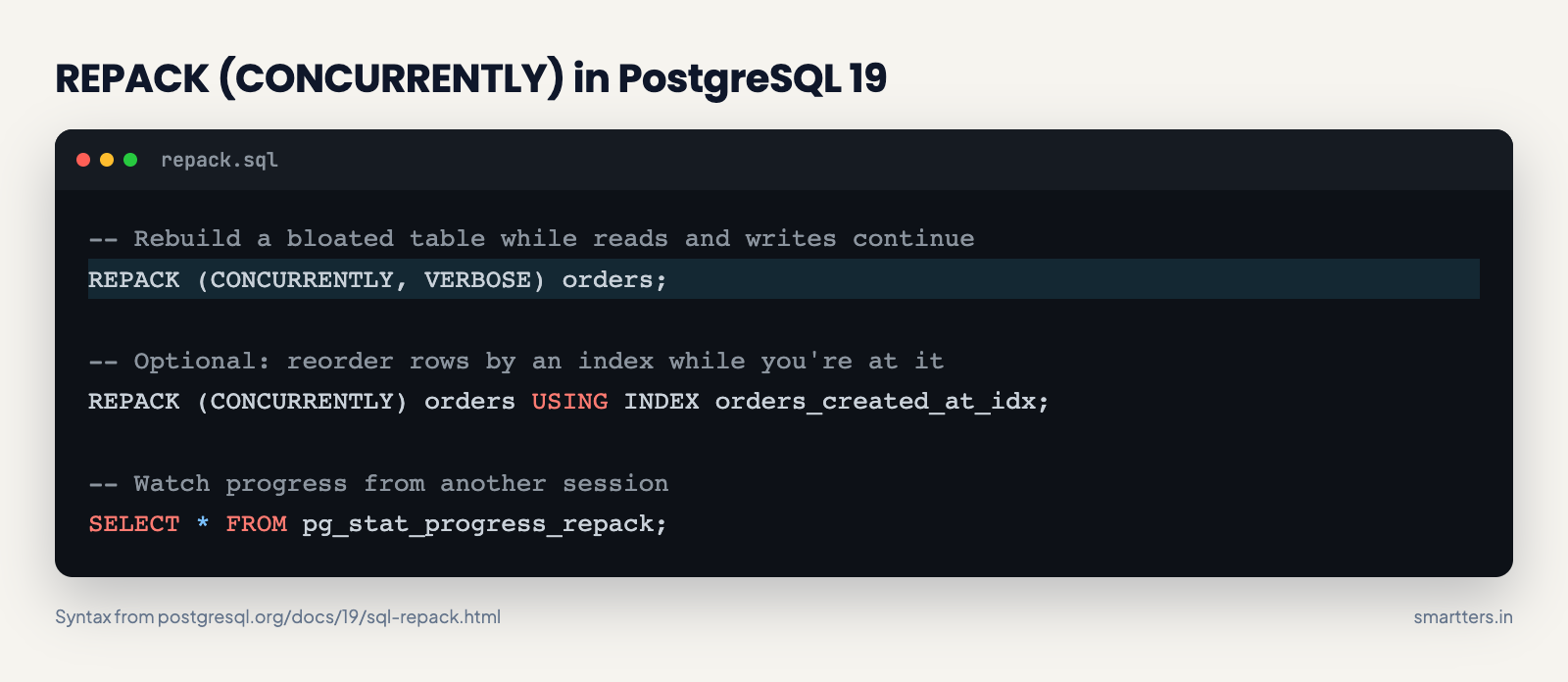
-- Rebuild a bloated table while reads and writes continue
REPACK (CONCURRENTLY, VERBOSE) orders;
-- Optional: reorder rows by an index while you're at it
REPACK (CONCURRENTLY) orders USING INDEX orders_created_at_idx;
-- Watch progress from another session
SELECT * FROM pg_stat_progress_repack;
The REPACK documentation explains how it avoids downtime. The bulk of the work runs under a SHARE UPDATE EXCLUSIVE lock, so reads and writes continue. PostgreSQL then takes an ACCESS EXCLUSIVE lock only for the final swap, after logical decoding has replayed the changes that came in meanwhile. Without CONCURRENTLY, that exclusive lock is held for the whole run.
The same page lists the catches, and they're worth reading before you schedule one:
- The table needs a primary key or an index-based replica identity. Unlogged tables, partitioned tables and materialized views aren't supported in concurrent mode.
- You need free disk space of at least the table size plus its indexes.
- It uses a replication slot, capped by the new max_repack_replication_slots setting.
- It's not MVCC-safe: the docs warn that concurrent snapshots can see the table as empty. And the command fails if more than about 104 million rows are updated or deleted while it runs.
- It can't run inside a transaction block, and it needs the MAINTAIN privilege on the table.
Our read: for a typical SaaS orders or events table with a primary key, this removes the most common reason to schedule a maintenance window. For huge, write-heavy tables, test it on a copy first.
WAIT FOR LSN: read your own writes from a replica
WAIT FOR LSN makes a server, usually a standby, pause until it has replayed (or written, or flushed) a given log position. That fixes the classic "I saved it, but the page shows the old value" bug. If you send reads to a replica, a user can save something and then read stale data from a replica that's a few milliseconds behind.
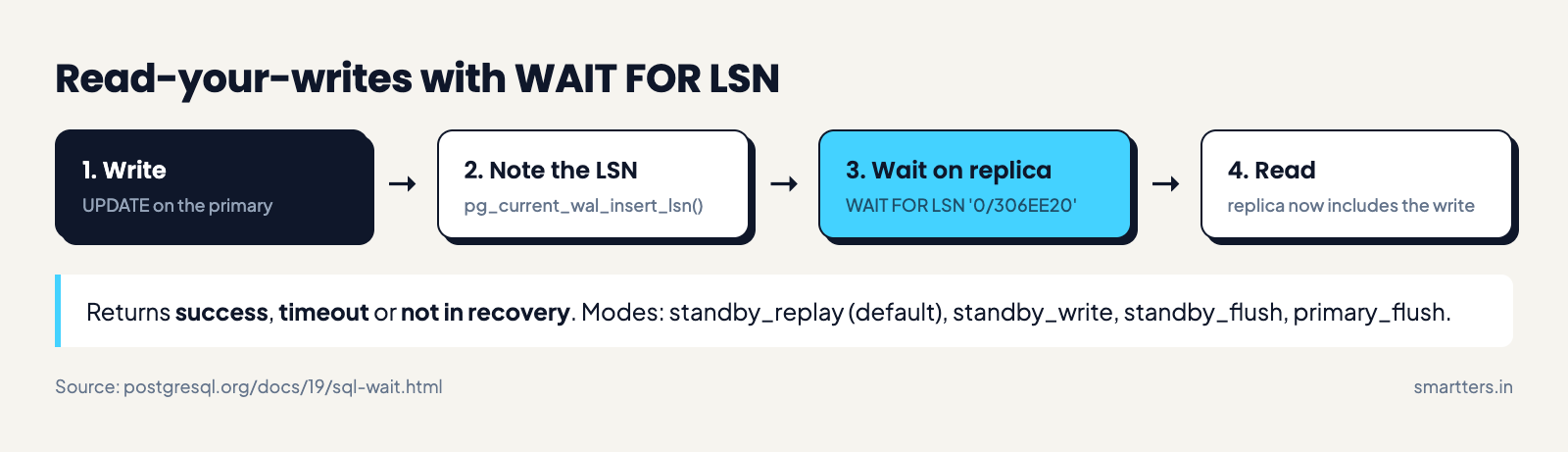
The WAIT documentation gives the syntax as WAIT FOR LSN 'lsn' [WITH (option, ...)]. The options are MODE (standby_replay by default, or standby_write, standby_flush, primary_flush), TIMEOUT and NO_THROW. It returns success, timeout or not in recovery. It must be a top-level command and can't run while your transaction holds a snapshot.
Here's how that pattern could look in a Node.js API using the pg driver. It follows the docs' own example; we haven't run it against PostgreSQL 19 yet.
// After the write commits on the primary, note where the WAL is.
await primary.query('UPDATE orders SET status = $1 WHERE id = $2', ['paid', id]);
const { rows } = await primary.query('SELECT pg_current_wal_insert_lsn() AS lsn');
const lsn = rows[0].lsn; // e.g. '0/306EE20'
// Wait and read on the SAME replica connection, not two pool queries.
// Utility commands don't take bind parameters, so validate the LSN format first.
if (!/^[0-9A-F]+\/[0-9A-F]+$/i.test(lsn)) throw new Error('bad LSN');
const client = await replicaPool.connect();
try {
const { rows: [w] } = await client.query(
`WAIT FOR LSN '${lsn}' WITH (TIMEOUT '100ms', NO_THROW)`
);
const db = w.status === 'success' ? client : primary; // lagging? read the primary
const { rows: [order] } = await db.query('SELECT * FROM orders WHERE id = $1', [id]);
return order;
} finally {
client.release();
}
The TIMEOUT '100ms', NO_THROW form comes straight from the docs' examples; with NO_THROW a timeout returns a status instead of an error. In practice you'd store the LSN in the user's session and only wait on reads that follow that user's own writes.
pg_plan_advice: pin the plan that keeps regressing
pg_plan_advice lets you describe, reproduce and nudge the planner's key decisions with a small "plan advice" language, and pg_stash_advice applies saved advice automatically by query ID. The community has long resisted Oracle-style query hints, so this is a notable shift.
The pg_plan_advice docs show the basic form:
SET pg_plan_advice.advice = 'JOIN_ORDER(f d)';
EXPLAIN (COSTS OFF)
SELECT * FROM join_fact f JOIN join_dim d ON f.dim_id = d.id;
EXPLAIN (PLAN_ADVICE) prints the advice string for a plan you like, so you can capture a good plan and keep it. The docs add two cautions. Advice only constrains choices the planner already considered, so it can't force any plan you want. And it can backfire when your data distribution changes, so treat it as a fix for a known regression, not a habit.
Logical replication: sequences and no-restart setup
PostgreSQL 19 replicates sequence values over logical replication and can switch logical replication on without a restart when wal_level is replica. Both remove friction from near-zero-downtime major upgrades.
Before this, a logical-replication upgrade copied your rows but not your sequence positions. After cutover, the next insert could collide with an existing ID unless you fixed every sequence by hand. The release notes list CREATE PUBLICATION ... FOR ALL SEQUENCES, ALTER SUBSCRIPTION ... REFRESH SEQUENCES and a pg_get_sequence_data() function to check sync.
If you run a service split across several databases and move data between them, this is the change to try first.
PostgreSQL 19 monitoring features and new system views
PostgreSQL 19 adds views that make lock contention and standby recovery easier to see without third-party tools. The release notes list three new views:
- pg_stat_lock, per-lock-type statistics.
- pg_stat_recovery, the recovery status of a standby.
- pg_stat_progress_repack, progress for the new REPACK command.
Two logging changes help too. log_lock_waits is now on by default, so long lock waits show up in your logs. And log_min_messages can be set per process type.
If your background job workers write results to Postgres, log_lock_waits being on by default will show which ones block each other.
What got cut from PostgreSQL 19
Several features that appeared in beta-era coverage are not in PostgreSQL 19, including SQL/PGQ property graph queries. None of them appear in the current release notes, dated as of October 9. EDB's October 18 write-up by Tom Kincaid and ComputingForGeeks' RC 2 retest list the reverts.
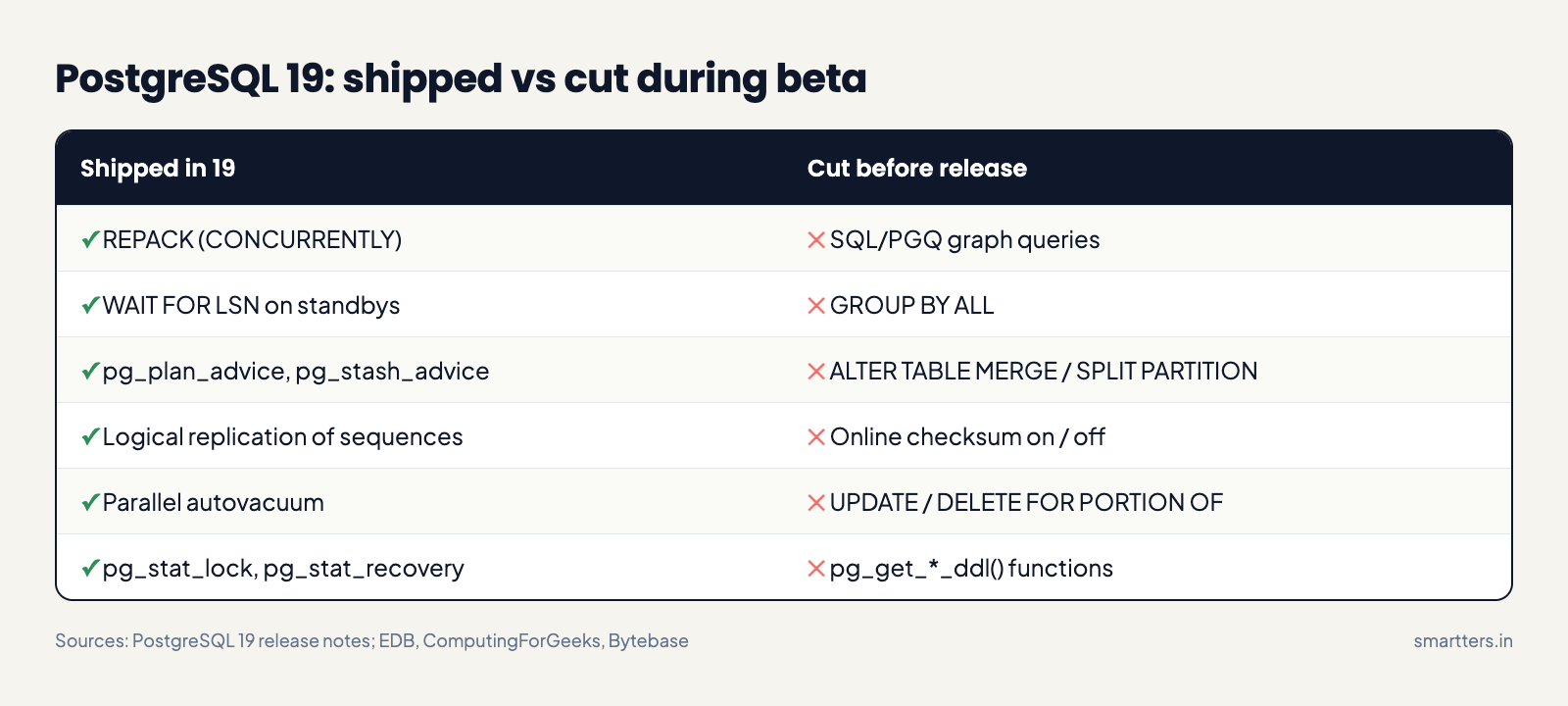
The cut list:
- SQL/PGQ graph queries (GRAPH_TABLE, property graphs)
- GROUP BY ALL
- ALTER TABLE ... MERGE / SPLIT PARTITION
- Turning data checksums on or off while the server runs
- UPDATE / DELETE ... FOR PORTION OF (temporal updates)
- The pg_get_*_ddl() functions for regenerating role, database and tablespace DDL (Bytebase says all three were removed in Beta 4, and none are in the release notes)
Some of these may come back in a later major release, but nothing official says so. If an article you're reading lists them as PostgreSQL 19 features, it was probably written during beta.
PostgreSQL 19 vs 18: what breaks on upgrade
Many apps will upgrade cleanly, but a handful of changed defaults and removals can surprise a backend team. The full list is in the migration section of the release notes. These are the ones most likely to touch application code:
Setting or behaviour PostgreSQL 18 PostgreSQL 19 What to do
MD5 passwords
Warns when an MD5 password is set
Also warns after each MD5 login
Move users to SCRAM-SHA-256, or set md5_password_warnings off
standard_conforming_strings
Can be off
Always on
Re-dump with it on; old dumps made with it off won't load
json_array() over zero rows
NULL
[]
Check code that tests for null
max_locks_per_transaction
64
128
Usually nothing
JIT
On
Off
Re-enable for analytics-heavy queries if needed
I/O workers
io_workers
io_min_workers, io_max_workers
Update config files
log_lock_waits
Off
On
Expect more lock-wait log lines
RADIUS auth
Supported
Removed
Switch auth method before upgrading
Sources: the PostgreSQL 19 migration notes and the PostgreSQL 18 release notes. Version 19 also bans carriage returns and line feeds in database, role and tablespace names, and pg_upgrade rejects clusters with btree_gist indexes on inet or cidr columns.
The upgrade itself is a major-version move: pg_upgrade, pg_dump / pg_restore, or logical replication, per the RC 1 announcement.
Should you upgrade to PostgreSQL 19 now?
For most production apps, the right move is to test PostgreSQL 19 now and upgrade after the first minor release. Here's how we'd decide by situation:
- Best for new projects starting this month: start on 19. You get REPACK and WAIT FOR LSN from day one. But your managed provider may not offer 19 yet, which matters if you're on RDS, Cloud SQL or Supabase.
- Best for teams fighting bloat or replica lag on 18: plan the upgrade for the 19.1 or 19.2 window. The fixes are real, but a first major release is where late bugs are most likely to surface.
- Best for apps on PostgreSQL 14: upgrade now, to 18 or 19. Version 14 got its final release on November 12 and receives no more security fixes. That same update "fixes 52 security vulnerabilities and over 140 bugs" across the supported versions.
- Stay on 18 if you can't test this quarter. It's supported until November 14, 2030, per the versioning policy.
What we don't know yet
The GA date is a plan, not a guarantee; the project says it can slip if a release-blocking bug turns up. Phoronix reported that PostgreSQL 19 was running behind schedule as AI and LLM tools surfaced more bug reports for developers to work through. We read that as more testing rather than a weak release, but it's still a reason to wait for 19.1 on critical systems.
REPACK (CONCURRENTLY) also has real limits: no MVCC safety for concurrent snapshots, the need for a primary key or replica identity, and a large disk-space cost. And we don't know when each managed Postgres service will offer version 19, so check your provider's roadmap before you plan dates.
How we checked this
Everything here comes from the PostgreSQL 19 release notes and command docs on postgresql.org, read on November 18, 2026, plus the RC announcements. We cross-checked the reverted features against the current release notes, EDB, Bytebase and ComputingForGeeks. We haven't benchmarked PostgreSQL 19 ourselves, and the Node.js example follows the official docs rather than a tested deployment.
Frequently Asked Questions
When is PostgreSQL 19 released?
PostgreSQL 19 is planned for general availability on November 19, 2026. The project confirmed the date with RC 2 on November 12, adding that it could slip if a blocking issue appears. Check postgresql.org for the final announcement.
Is SQL/PGQ (graph queries) in PostgreSQL 19?
No. SQL/PGQ property graph queries were reverted during the beta cycle and aren't in RC 1 or RC 2. Release candidates only take bug fixes, per the RC 1 announcement, so they won't be in the GA release either. Articles written during the beta often still list them.
What is the difference between PostgreSQL 19 and 18?
PostgreSQL 19 adds REPACK (CONCURRENTLY), WAIT FOR LSN, pg_plan_advice, sequence replication, parallel autovacuum and new monitoring views. It also changes defaults: JIT is off, max_locks_per_transaction is 128, and MD5 logins log a warning.
How do I upgrade to PostgreSQL 19?
Use a major-version upgrade method: pg_upgrade, pg_dump and pg_restore, or logical replication. Read the migration notes first, test your app against a 19 copy of production data, and rebuild extensions for the new version.
Does REPACK replace pg_repack?
For tables with a primary key or replica identity, yes. REPACK (CONCURRENTLY) brings online table rebuilds into core PostgreSQL, so you don't need a third-party extension. It has its own limits, such as requiring a primary key or replica identity, so check the docs against your tables.
Is PostgreSQL 14 end of life?
Yes. PostgreSQL 14.25, released on November 12, 2026, was the final release of version 14, and it gets no more security or bug fixes. Upgrade to 18 or 19.
What to do this week
Spin up PostgreSQL 19 in a staging environment, restore a recent production dump, and run your test suite and slowest queries against it. For more on keeping a backend lean, see our take on serverless backends. If you'd rather hand the upgrade plan to someone else, talk to our SaaS product development team.
Then put two dates in the calendar: your provider's PostgreSQL 19 launch, and February 11, 2027. That's the next scheduled minor release on the project's roadmap, and the earliest likely date for 19.1.